YOUR WINDOWS GAMING WORKSPACE

MAKE EVERY
INPUT
YOUR OWN.

Bring your games, controller settings, and favorite customizations together. One room. Your setup.

Built for WindowsDesktop + handheld
TGR / CONTROL SYSTEM
THE GAME ROOMPRODUCT PREVIEW
SetupPlayInput Preview···
YXBA YOUR CONTROLS. REIMAGINED.
Choose your configurationProfiles that fit the way you play
SEE EVERY INPUTPhysical → Virtual
DESIGNED FOR YOUR NEXT SESSION ↗
Your game library Controller workspace Custom overlays 6 optional modules

01 / THE EVERYDAY ESSENTIALS

LESS SETTING UP.
MORE PLAYING.

Your gaming setup deserves a home. Keep your library organized, your controls visible, and your preferences close.

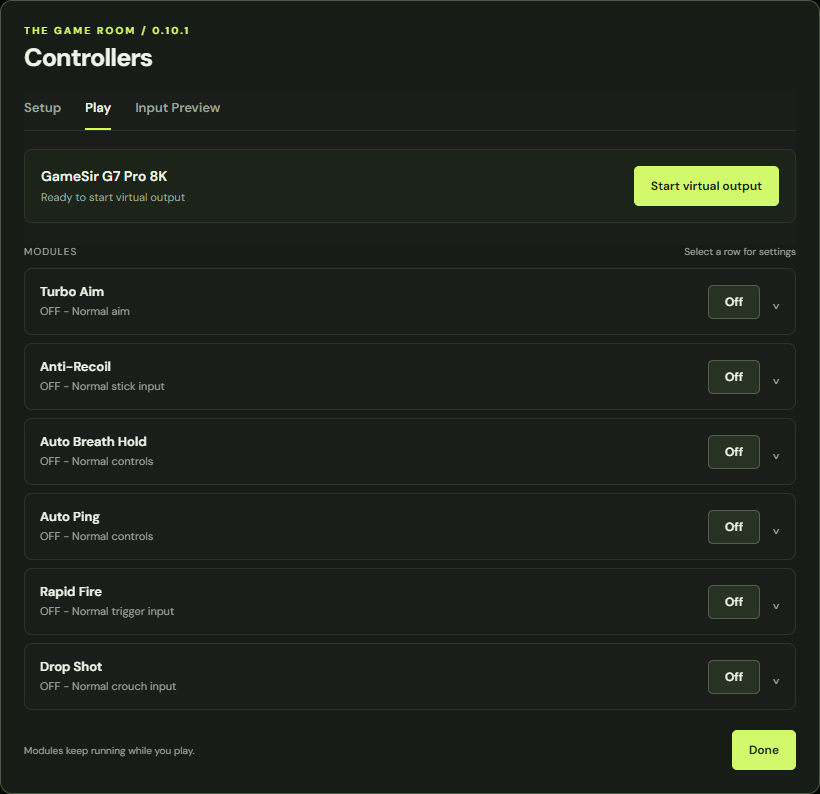
Choose your controller, start virtual output, and see what your buttons and triggers are sending. Dedicated tabs keep setup separate from play.

CONTROLLER WORKSPACE0.10.1
Game Room controller page with Setup, Play, and Input Preview tabs and six module controls

Actual Game Room interface · sample settings and devices

A HOME FOR YOUR GAMES

Your library. With room for the details.

Scan installed games, pin favorites, keep personal notes, and export a backup. Add a game manually when it isn’t found.

SteamEpic GamesXboxGOG

SMALL DETAILS. YOUR WAY.

FIND YOUR
CENTER.

A center dot that recenters as your display changes. Fine-tune its size, color, opacity, and position in one-pixel steps, then keep those settings for next time.

Fading status notifications keep module and controller changes in view.
CENTER DOT / INTERACTIVE PREVIEW
X 0 / Y 0
Centered for this display
16:9

OPTIONAL ADD-ON 02 / MODULE PACK

SIX MODULES.
YOUR COMBINATION.

Go deeper into your setup. Explore each module, adjust its behavior in the app, and see your inputs turn into output.

MODULE SPOTLIGHT INTERACTIVE DEMO

Anti-Recoil

Tune vertical and horizontal right-stick adjustments while holding aim and fire. Save your values in a profile for your next session.

Vertical + horizontalAdjustable rampController shortcuts
PHYSICAL INPUT · LT + RTREADY
VIRTUAL OUTPUT · STICK ADJUSTMENTILLUSTRATED
Input0Output

Illustrates an input adjustment, not an in-game recoil measurement.

Website simulation only. This preview does not connect to your controller or run modules.

Individual switches. Saved preferences. Visible feedback.See what’s included ↗

03 / FROM DESKTOP TO HANDHELD

A FAMILIAR SETUP.
WHEREVER YOU PLAY.

Use the same workspace on your Windows desktop and compatible handheld. Export a profile from one device and import it on the other.

DESKTOP PROFILE
My setup
EXPORT / IMPORT
My setup

Illustrated devices · profile transfer is manual

  1. 01

    Connect & check

    Choose a detected controller. Guided setup checks the required output drivers and controller visibility.

  2. 02

    Make it yours

    Preview your inputs, customize overlays, and save a profile. Add the optional modules when they fit your setup.

  3. 03

    Play, with clear feedback

    Start virtual output and see confirmation. Restore normal controls whenever you need them.

Tested in personal use on desktop + X20. Controller and game compatibility varies. Virtual output uses ViGEmBus; controller hiding uses HidHide. Driver installation may require Windows approval and a restart.

04 / BUILD YOUR GAME ROOM

START WITH THE APP.
ADD YOUR EXTRAS.

The core workspace stands on its own. The planned Module Pack adds six controller customizations as a separate, optional purchase.

THE FOUNDATION

Game Room

Your everyday gaming workspace.

  • Installed-game library, favorites & notes
  • Controller detection & virtual output
  • Setup, Play & Input Preview
  • Center dot & fading status overlays
  • Game profiles & custom shortcuts
  • Mouse & keyboard input tools and macros
  • Restore normal controls
Private test build · Approval requiredGet download access
OPTIONAL PURCHASE6 MODULES

Module Pack+

More ways to configure your controls.

  • Anti-Recoil
  • Rapid Fire
  • Drop Shot
  • Auto Ping
  • Auto Breath Hold
  • Turbo Aim
  • Individual settings & live module feedback
Pricing announced at launch

The personal test build includes the current modules without a purchase. The separate paid pack is planned for a future release; pricing and license terms will be published before checkout opens.

PRIVATE TEST / WINDOWS x64

TAKE A LOOK.
GET EARLY ACCESS.

Explore Game Room freely. Installer downloads are available only to testers approved by the Game Room owner while development continues.

  1. 1Contact the Game Room owner to request access.
  2. 2After approval, sign in with your approved ChatGPT account.
  3. 3Download the ZIP and follow the installation instructions.

Game Room 0.10.1

Personal test build · Windows x64

PRIVATE

161 MB · All six current modules included

Open approved downloads

Approval is required. Signing in alone does not grant download access.

Want to try Game Room? Contact the person who shared it with you to request access from the owner. Once your account is approved, use the button above.

Already downloaded an earlier copy? Your installed app continues to work.

THE DETAILS

GOOD QUESTIONS.
CLEAR ANSWERS.

Know what to expect before your next session.

Can I buy or download Game Room here?+

Anyone can explore this website. Downloads of the Windows x64 personal test build require approval from the Game Room owner and sign-in with an approved ChatGPT account. The test build includes the current modules. Paid checkout and purchase activation are not open yet; pricing and license terms will be announced before sales begin.

Do I need the Module Pack?+

No. The planned base app includes the library, controller workspace, virtual output, overlays, profiles, and mouse & keyboard tools. The six controller modules are being presented as an optional paid add-on. The current personal build does not yet enforce purchase licenses.

Does it work with every controller and game?+

Universal compatibility has not been established. Game Room has been tested in personal use with a GameSir G7 Pro 8K on desktop and built-in X20 controls. Results depend on the device, its Windows input mode, the game, and its input settings. Always check a game's rules before using automation modules; this site does not promise anti-cheat approval.

What do ViGEmBus and HidHide do?+

ViGEmBus provides virtual Xbox controller output. HidHide can prevent a game from receiving both the physical and virtual inputs. Game Room checks their setup and provides a way to restore normal controls. ViGEmBus is a retired project, and its final release remains a dependency of the current app.

Can I move my settings between devices?+

Yes. Export a game profile and import it on another Game Room installation. Profiles include module settings and mouse & keyboard combinations. Library notes and favorites have their own backup tools. There is no automatic cloud sync in the current app.

Does Auto Ping detect enemies?+

No. It sends your selected ping button once when you press R2/RT while already holding L2/LT. Game Room does not detect enemies or inspect the game world.

Will my purchase cover both my PC and handheld?+

The purchase system and device allowance have not been finalized. Exact activation limits, support terms, and what each pack includes will be clearly listed before you can buy.

YOUR NEXT SESSION STARTS HERE

WELCOME TO
YOUR GAME ROOM.

Find your combination

THE OPTIONAL MODULE PACK

YOUR EXTRAS.
ONE PLACE.

The planned pack includes Anti-Recoil, Rapid Fire, Drop Shot, Auto Ping, Auto Breath Hold, and Turbo Aim, with individual controls and visible feedback.

Purchases are not open yet.

Pricing, device limits, and license terms will be announced before launch. This preview does not take payments or activate modules.

Explore the six modules

WEBSITE INFORMATION

YOUR PRIVACY.

This page has no marketing analytics, advertising trackers, signup form, or payment collection. Its demos run in your browser without reading controller input, scanning your computer, or saving your choices.

The website host may process normal access information needed to serve and protect the site. Fonts and screenshots are served with this public website. Installer downloads use a separate private page and require ChatGPT sign-in plus approval from the owner. Account details used for access are handled by the hosting platform. The website does not run the installer.

A complete purchase and account privacy policy will be provided before those services launch.

Game Room interface

Full Game Room controller interface

Actual app interface with sample settings and devices.